What is a SKP File? SketchUp 3D Model Format Deep Dive & Ecosystem Compatibility Guide
.skp is the global standard for architectural and interior CAD modeling. This comprehensive guide unpacks internal data structures, embedded textures, OLE to ZIP container evolution, and native compatibility across 3ds Max, Rhino, Revit, Blender, and rendering pipelines.
Across architectural concept design, interior detailing, millwork fabrication, exhibition staging, and digital twin visualization, the .skp extension is one of the most widely circulated 3D CAD asset formats worldwide.
Yet newcomers to the AEC industry, cross-disciplinary collaborators (such as structural consultants, cost estimators, and site supervisors), or designers transitioning from 3ds Max, Rhino, or AutoCAD frequently encounter recurring questions:
- Why does a
.skpfile retain all textures when emailed to a client, without requiring an external maps folder? - Why does renaming
.skpto.zipfail to produce an editable model, and how is it packaged internally? - Why do 3ds Max, Rhino, or Revit fail to import modern
.skpfiles directly, reporting parsing errors? - Since Trimble eliminated backward "Save As" options in SketchUp 2024, how has cross-version collaboration fundamentally shifted?
This guide provides an exhaustive technical breakdown of the .skp format: its container architecture evolution, 3D entity hierarchies, embedded asset management, and cross-platform compatibility best practices.
Disclaimer & Trademark Notice: SKPDowngrade operates independently and is not affiliated with Trimble Inc. SketchUp is a registered trademark of Trimble Inc.
1. What Data is Actually Encapsulated Inside a .skp File?
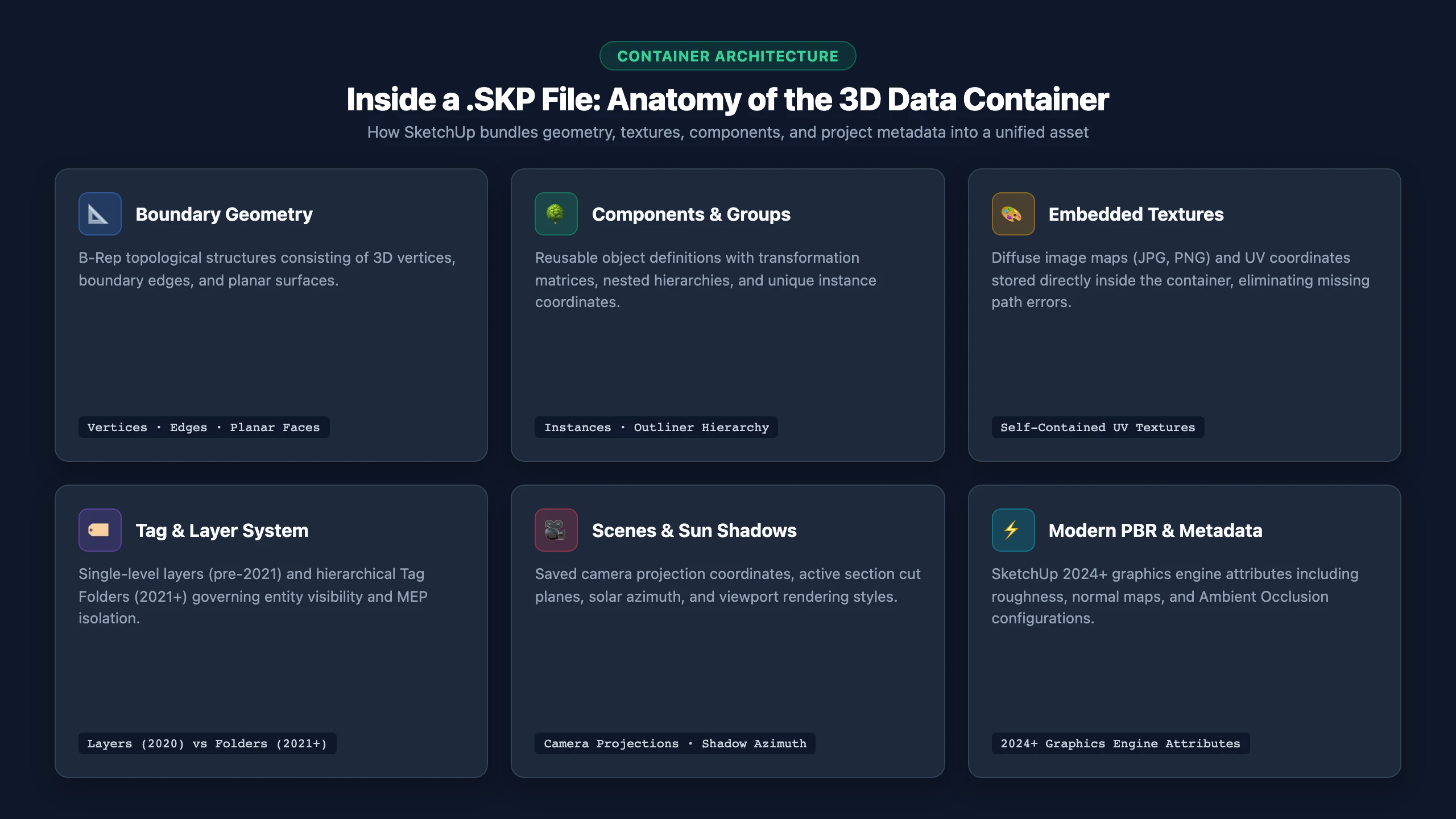
Unlike basic mesh exchange formats (such as STL or OBJ) that simply store unorganized polygon soup, a .skp file is a fully integrated, self-contained parametric CAD/BIM data container. A standard .skp model bundles the following architectural elements:
1. Boundary Representation Geometry (B-Rep)
- Vertices & Edges: Stores exact Cartesian 3D coordinates $(X, Y, Z)$ and linear boundary segments connecting them;
- Planar Faces & Polygons: Surfaces defined by at least three coplanar closed edges. Unlike software that enforces pure triangulation, SketchUp natively supports planar multi-sided polygons (N-Gons);
- Face Normals (Front vs. Back Faces): Every face possesses an explicit normal orientation (traditionally rendered white/light gray on the front, and blue-gray on the reverse). Many render engines (such as Lumion or V-Ray) leak light or render reverse faces as transparent, making correct face orientation critical in professional modeling.
2. Components & Groups: Instance-Based Architecture
- Groups: Encapsulate geometry to prevent accidental merging with adjacent elements (avoiding "sticky geometry");
- Components: Support global instancing for prefabricated architectural components (such as doors, curtain wall panels, structural steel, or seating).
- Technical Efficiency: If an assembly contains 100 identical chairs, the
.skpfile records only one primary component definition. The remaining 99 occurrences are stored merely as lightweight 3D transformation matrices (capturing rotation, translation, and non-uniform scale). This keeps complex project files exceptionally compact.
- Technical Efficiency: If an assembly contains 100 identical chairs, the
3. Embedded Textures & Material Assets
- Traditional 3ds Max workflows reference external bitmap paths that frequently break upon transfer.
- Self-Contained Packaging: All diffuse image textures (JPG, PNG) mapped to entities are embedded directly within the binary
.skpcontainer. Moving the file to another workstation preserves texture assignments and UV coordinates without missing map errors; - PBR Extensions: Beginning with SketchUp 2024, files also store modern PBR material parameters (such as roughness and normal maps) for the updated graphics engine.
4. Tagging System (Tags / Former Layers) & Tag Folders
- Pre-2020: The software utilized "Layers," which functioned primarily as visibility toggles;
- 2020 Transition: Trimble rebranded Layers to "Tags" to eliminate confusion with AutoCAD physical drawing layers;
- 2021 Major Milestone: Introduced hierarchical "Tag Folders", allowing architects to nest hundreds of sub-tags into organized assemblies (such as structural grids, MEP services, and interior fit-outs).
5. Camera Projections, Presentation Scenes & Sections
- Scenes: Record saved client viewpoints, field-of-view (FOV), orthographic/perspective camera projections, sun shadow azimuths, and viewport styles;
- Section Planes: Cut dynamic sections through models, directly linking into Trimble LayOut for construction document production.
2. Container Evolution: From OLE Storage to Unified ZIP Archives
Understanding the underlying storage structure explains why older software strictly fails to read newer files:
| Historical Era | Representative Releases | Container Architecture | File Header Token | Compatibility Behavior |
|---|---|---|---|---|
| Legacy Proprietary Era | SketchUp 3.0 ~ 8.0 | Proprietary binary compound document (analogous to Microsoft OLE Structured Storage) | 8.0.1, etc. | Strict one-way backward compatibility |
| Annual Isolated Era | SketchUp 2013 ~ 2020 | Annual serialized binary container format | {17.0.1}, {20.0.1}, etc. | Each year used an isolated format; desktop Save As supported legacy years |
| Unified Container Era | SketchUp 2021 ~ 2027 | One shared container, not a separate file format each year | {21.0.xxx} ~ {27.0.xxx} | 2021+ files open across modern versions; strictly unreadable by SketchUp 2020 and older |
Under the Hood: Why does a 2024 model trigger an "Incompatibility Error" when opened in SketchUp 2020? SketchUp 2020 looks for its own
{20.0.1}header. It cannot read the container SketchUp has used since 2021. Even a box drawn in SketchUp 2024 will be rejected by a 2020 workstation.
3. Comparing .skp with Common 3D Interchange Formats
| File Extension | Format Type | Geometric Representation | Material & Texture Retention | Hierarchies & Transformations | Downstream Target Ecosystem |
|---|---|---|---|---|---|
| .SKP | Native CAD/BIM Container | Boundary Representation Polygons (N-Gons) | Embedded self-contained (Diffuse + PBR) | Fully preserved (Local axes & instances) | Architectural modeling, detailing, LayOut |
| .OBJ | Static Discrete Mesh | Pure triangle or quad meshes | Requires external .mtl and bitmap files | Flattens into discrete polygon clusters | 3D printing, ZBrush sculpting, legacy VFX |
| .FBX | Complex 3D Animation Container | Polygon meshes + skeletal rigs | Supports embedded textures | Retains scene node graphs | Game engines (Unreal/Unity), Maya, character animation |
| .DAE (Collada) | Open XML Model Schema | Polygon faces and basic lines | External texture references | Basic grouping; complex hierarchies may distort | Historic 3D Warehouse exports, GIS packages |
| .DWG / .DXF | Vector CAD Interchange | Line work, solids, or surface meshes | Typically layer color-coded; no rich UVs | Supports AutoCAD block definitions | Construction working drawings, engineering coordination |
| .glTF / .GLB | Modern Web3D / Metaverse Standard | Triangulated mesh + PBR transmission | GLB bundles all PBR textures into one file | Standardized scene graph for runtime engines | In-browser 3D Web, ARKit/ARCore, eCommerce viewers |
4. Native .skp Import Support Across Major 3D Software
Design practices frequently exchange .skp models with downstream modeling packages. Here is the reality of native importer support:
1. Autodesk 3ds Max
- 3ds Max includes a native
Import > SketchUpmodule; - Version Ceilings: Support is tied strictly to the 3ds Max release cycle. 3ds Max 2020, for example, natively parses files up to SketchUp 2019/2020; directly importing modern 2024+ assets triggers format errors;
- Best Practice: Convert assets to SketchUp 2020 or 2017, and enable "Combine By Material" during import to minimize poly count fragmentation.
2. Robert McNeel & Associates Rhino
- Rhino features an exceptional CAD import engine supporting direct
.skpdrag-and-drop; - Behavior: Surfaces convert into Rhino polysurfaces or meshes based on topology;
- Recommendation: If high-version assets fail to import layer structures cleanly, downgrade to SketchUp 2020 to retain layer colors and component hierarchies.
3. Autodesk Revit (BIM Coordination)
- Architects frequently use
Insert > Import CADor load.skpgeometry into Revit In-Place Families; - Sensitivity: Revit has virtually zero tolerance for modern container schemas. Converting assets to SketchUp 2017 provides the cleanest geometry with minimal surface artifacting.
4. Blender
- Blender does not natively bundle an internal
.skpimporter in its vanilla download; - While community add-ons exist (such as the SketchUp Importer), their reverse-engineered parsers generally top out at pre-2021 binary headers. Converting files to 2020 or 2017 is the most reliable way to ingest SketchUp assets into Blender pipelines.
5. Why Cross-Version Collaboration Demands Dedicated Downgrade Tools
Prior to 2024, solving version gaps was straightforward: an author clicked File > Save As and selected SketchUp 2017 or 2020 from the drop-down menu.
Starting with SketchUp 2024, Trimble fundamentally altered this dynamic:
- Desktop Selectors Stripped: The native interface only saves to the contemporary unified container;
- Push Toward Universal Subscriptions: The policy aims to move downstream collaborators onto annual software subscriptions;
- Stopgap Workarounds Obsolete: 3D Warehouse legacy downloads have been retired; exporting to intermediate OBJ/DAE destroys CAD groupings and texture UV alignments.
Two Standard Export Targets for Cross-Version Delivery:
- Targeting SketchUp 2020: Generates the
{20.0.1}file header. It flattens tag folders while preserving single-level tags, diffuse textures, and component hierarchies. This serves as the premier bridge for resolving 2021–2023 import mismatches and external rendering suite bottlenecks; - Targeting SketchUp 2017: Generates the universal
{17.0.1}header. It guarantees compatibility across legacy workstations, academic labs, and older distributed render farms.
Need to verify the internal build of an unknown .skp file? Inspect it client-side with our Free SKP Version Detector, or browse our Version Conversion Directory to create your legacy compatible file!